 AI safety training for construction & plants
Your safety videos,
now on the lens.
Now in pilot: the same CrewClip videos your crew trains with before the shift, right on the lens of their AI glasses — on the job, one step at a time, in each worker’s own language. Hands stay on the work.
- SeeThe video and each step of your procedure, right in front of them.
- AskQuestions out loud. Voice notes instead of typing with gloves on.
- CheckA photo checked by AI, then “check” to go on to the next step.
- RecordEvery step, photo and note logged — the report writes itself.
A one-time jobsite pilot, set up with you. A maintenance navigator on Even Realities G2 glasses is already built.


 CrewClip · Fall protectionStep 3 of 3

Stop boring
safety training.
No more explaining the same rules over and over. For construction sites and plants, CrewClip’s AI turns your safety rules into a training quiz — a short video in each worker’s language that stops to ask. Your crew learns by answering, and you see who got it.


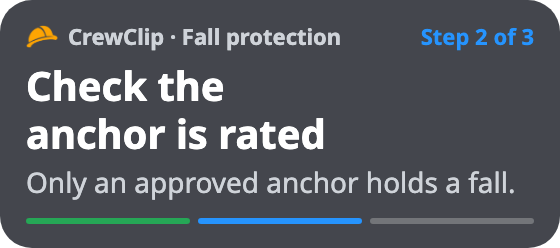
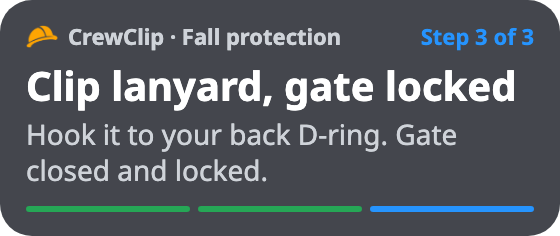
The same steps go on the crew’s AI glasses — tap the temple or say “check”, hands stay on the work.
 On the lens · Step 2 of 3
 On the lens · Step 3 of 3
Your next toolbox talk,
built from this week’s site.
Stock videos show someone else’s site, in English only. Watch one week on a trench job: this week’s photos become the talk, the crew scans a QR code at the gate and watches in their own language, and you see who’s covered.
From “have to”
to “want to.”
Most safety training is a box to tick — a long talk, a sign-in sheet, a crew counting the minutes. A CrewClip quiz video is short, in each worker’s language, and it plays like a game, so they actually want to finish. And on the job, the procedure stays with them — one step at a time, right on the lens of their AI glasses.
 CrewClip · Fall protectionStep 3 of 3
They tap the steps in order and spot the hazard in the picture. The video moves when they do.
A wrong answer gets a nudge and another try until it clicks. No one gets called out.
A few minutes on their phone before the shift — then the same steps on their glasses, in the language they think in.
Talking alone rarely sticks — especially on construction sites, with new hires, part-timers, or people who speak another language first.
Our AI turns your rules into a short video that stops and asks questions. So anyone can follow it, and managers see who really understood.
Telling them isn’t
the same as them understanding.
The same talk, again and again
Every new hire, every new sub, every new site. Explaining the same safety rules by mouth wears out your best people.
Talking alone doesn’t stick
A morning toolbox talk is forgotten by lunch, the binder stays in the truck — and you can’t tell who actually did it right.
Multilingual crews and new subs
Different languages, different shifts, new subcontractors every week. The details get lost — and on a jobsite or a plant floor, that’s where serious accidents start.
CrewClip puts the procedure where the work is — on the lens. Type a few sentences or drop in your procedure, JSA or SOP: the AI builds the steps for the AI glasses, plus a short quiz video for before the shift — in each worker’s language.
Training happens before the shift.
Mistakes happen on the job.
A video before the shift is a good start — but by the time they climb, it’s a memory. CrewClip puts the procedure on the lens at the moment of work, and keeps the quiz video for before the shift.
- Forgotten by the time the work starts
- The binder stays in the truck
- You know they watched — not whether they did it right
- The procedure on the lens, one step at a time, right when the work happens
- Ask out loud, check a photo, say “check” to go on
- Every step recorded — you see who did it right
- The quiz video still runs before the shift, in each worker’s language
The procedure is on the lens.
Not in a binder.
The AI turns your procedure into steps on the glasses — one at a time, in each worker’s language, with the checks built in. The same steps and questions as your quiz videos, right where the work is.
 CrewClip · Fall protectionStep 2 of 3
Your procedure, one step at a time
Harness, anchor, lanyard — each step on the lens, in the worker’s language, with why it matters. Tap the temple or say “check” to go on. Every step is logged.
No — a guardrail isn’t a rated anchor. Use the beam clamp from the gang box.
Answers, gloves on
Not sure? Ask. The answer comes back on the lens, in their language — no typing with gloves on.
CrewClip · Trench safetyQuick checkA quick check between steps
One spoken answer confirms the rule before the next step. Every answer lands in the record.
The steps and the quick check come from real CrewClip safety videos (fall protection and trench safety). The lens views are illustrations.
Make an AI glasses tutorial.
In minutes, with AI.
Drop in your procedure
Type the job — or drop in the procedure, JSA or SOP you already have: PDF, PowerPoint, Word or Excel.
The AI builds the steps
One step per screen, in each worker’s language — what to do, what to check, and a short clip from your quiz video. Safety-critical lines are flagged for a qualified person to approve.

Work it on the glasses
The crew taps the temple or says “check” to go on, and asks out loud when unsure. Every step, photo and note lands in the record.
Know who did it right.
Not just who pressed play.
Every step done on the glasses and every quiz answer land in one dashboard. And the LMS basics are already there — courses, sign-in, completion and records — without an LMS project.
Tap the three checks in order Needs review
46%What do you tie off to?
96%Coverage
Who has finished the required trainings — by site, by training and by person.
Quiz results
Answer rate, first-try accuracy and the hardest questions first.
Playlists
Group videos into one training link — a course your crew opens from one QR code.
Sign-in before it plays
A phone number or email and their worksite. No app, no password.
Steps from the glasses
Who did each step, and when — with the photo check and the voice note.
CSV for your records
Completions, quiz answers and watch data, ready for an audit.
Try it on your site. Then roll it out.
Two ways to start: a one-time pilot on your own jobsite — quiz videos and AI glasses, set up with you — or a talk about rolling it out across your sites and crews.
Try it on one of your jobsites — quiz videos and AI glasses, set up with you
Set up by our team with your procedure on the lens
Your own crew tries it on the job
You see every step and every answer
- Quiz videos from your own rules
- Your procedure step by step on AI glasses
- Every worker’s language — 60+
- Step records and quiz results
for your sites and crews — after the pilot, or right away
Sized to your sites — credits, quizzes and people
Quiz videos and AI glasses tutorials for every crew
- Every worker’s language — 60+
- Several sites and workspaces
- Sign-in, records and reports
- Invoicing, onboarding and a dedicated success manager
Prices in US dollars. A pilot is set up by our team after you ask — book a call, or send a message and we reply by email.
You don’t have to be.
We’ll set you up.
A real person from our team helps you get started — from your first procedure on the glasses to your crew signing in. If you can send a text, you can run CrewClip.
- Your first tutorial, togetherWe help you turn one of your own procedures into steps on the glasses — and a quiz video for before the shift.
- Your sites and crew, set upSites, sign-in, the QR codes for the gate or the trailer, and the glasses for your pilot crew — we help you get them ready.
- A person to askQuestions go to someone on our team, not a bot.
Used by 300+ companies.
Built for real crews.
Our engine has run training for two years at more than 300 companies — mostly construction sites, where many workers speak another language and need safety training to prevent serious accidents, plus factories. Now construction companies in the US are starting with CrewClip.
What are the AI glasses?+
Can we use the glasses now?+
What is a quiz video?+
Who is it for?+
Is it an LMS?+
Who writes the questions?+
We’re not tech people. Can we still use it?+
Do workers need an app or an account?+
How long does it take?+
Build the next jobsite with AI glasses.
Procedures on the lens, hands on the work, every step on record — how sites run in the AI era. Start with a pilot on your own jobsite, or talk to us.